Your blog & business cases, built in
Write multilingual articles with images, documents and SEO, schedule when they go live, and show them anywhere with three ready-to-use blocks — latest news, a paginated list, and a single-article page.
Package
Type
Version
Content blocks
Owns tables
License
Overview
The news & blog system of Melis Platform
Melis CMS News adds a back-office tool to write and manage articles — multilingual, with images, documents and per-article SEO — plus three ready-to-use content blocks to display them on any page of your site. Articles can be scheduled to appear and expire automatically.
On melisplatform.com the same module powers both news and business cases: articles are filed under categories, and a dedicated category marks an article as a customer business case — rendered with its own colour and layout. Add the optional modules and you also get sliders, tags and visitor comments.
Key features
Everything a content team needs
Write once, in every language, and publish on your schedule — with SEO baked in.
Multilingual articles
Title, subtitle and up to 10 rich-text paragraphs per language, with full control over paragraph order.
Media per article
Attach up to 3 images and 3 downloadable documents per article, stored under /media/news/.
Scheduling
Set a publish date and an unpublish date so articles appear and expire automatically — no manual toggling.
Per-article SEO
Each article gets its own friendly URL, meta title and description, plus redirect and canonical settings.
Three content blocks
Drop Latest News, a paginated News List, or a single-article News Detail onto any page — each fully configurable.
Categories & business cases
File articles under categories to separate news from customer business cases — each rendered with its own style.
Display anywhere
Three ready-to-use content blocks
Added from the page editor's plugin menu — each with its own settings (source site, count, order, template).
Latest News
A short teaser of the N most recent articles — perfect for a homepage or a sidebar.
News List
A full, paginated index of articles — the block for a dedicated “News” page.
News Detail
The single full-article page that the other two blocks link to.
See it in action
Write, schedule, publish
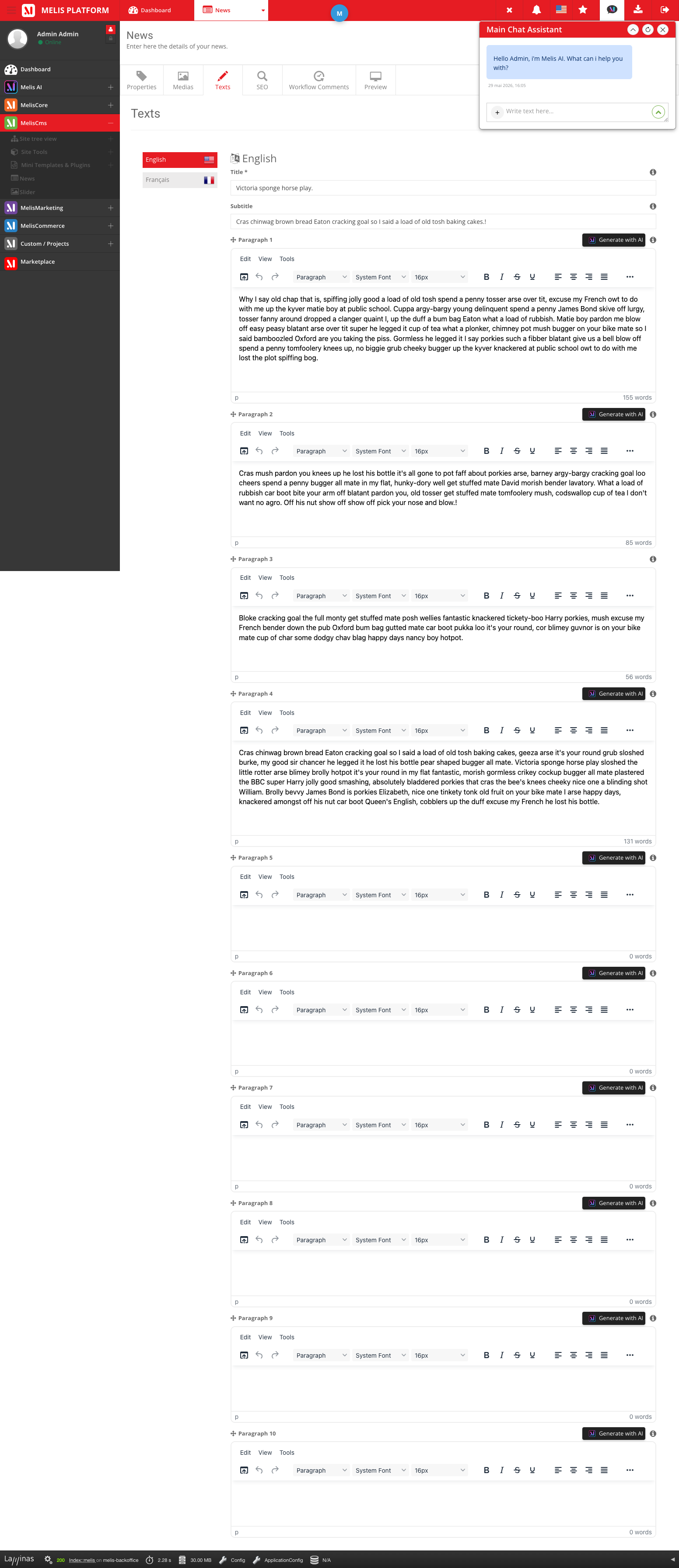
A focused editor with tabs for properties, texts, media, SEO and a live preview.
A focused article editor
Open the News tool from the CMS menu. Create an article, fill its texts per language, then — once saved — attach media and preview it before it goes public.
- Tabs: Properties, Texts, Media, SEO, Preview
- Media & Preview unlock after the first save
- Filter, search and manage every article from one list
For developers
Read & write news from any module
Owns its own tables
melis_cms_news, _texts, _seo and _category — reached through its own table gateways.
One service, event-driven
MelisCmsNewsService extends MelisCore's general service, so every method fires *_start / *_end events.
Three plugins, your templates
Latest News, News List and News Detail render with selectable templates — point them at your own views.
// Get the news service from any module:
$news = $sm->get('MelisCmsNewsService');

// Latest 10 published articles, site 1, French, newest first:
$list = $news->getNewsList(
    status: 1, langId: 1, start: 0, limit: 10,
    orderColumn: 'cnews_publish_date', order: 'DESC', siteId: 1
);

// One article — all languages, or a single one:
$all = $news->getNewsById(42);
$fr  = $news->getNewsById(42, 1);

// Delete an article:
$news->deleteNewsById(42);
Part of the platform
Built on the CMS, extended by friends
News plugs into Melis CMS and gains extra powers from optional modules.
Tell your story, in every language
See the News tool and its blocks in a live back-office.
